
Discord Rich Presence
#Overview
Discord Rich Presence allows your Minecraft server to customize how players appear in Discord while playing on your server. With the Dawn Server API, you can dynamically update a player's Discord status to show:
- Custom server icons
- Activity descriptions
- Player counts and party sizes
- Timestamps for activities
- And more!
This feature helps promote your server through players' Discord profiles, enhances the social experience, and provides useful information to friends viewing a player's status.
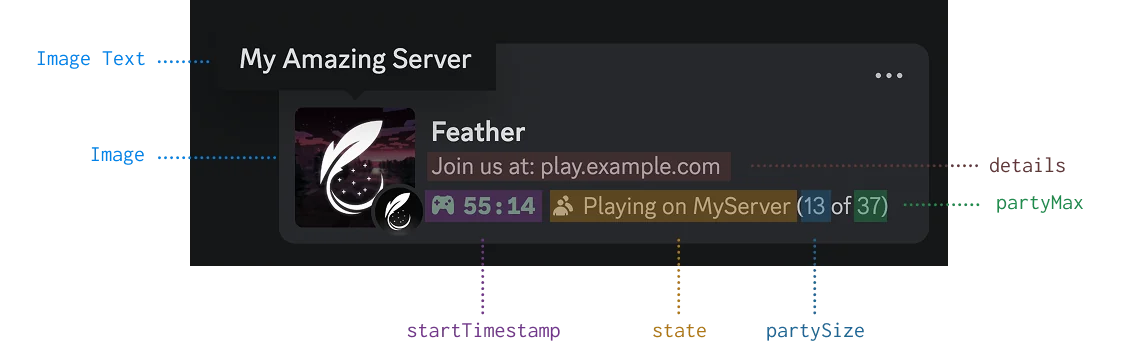
Image shows a Discord profile with custom game status showing server name, activity details, player count, and server icon
#Basic Usage
#Setting Discord Activity
To set a player's Discord activity, use the MetaService through FeatherAPI:
DiscordActivity activity = DiscordActivity.builder()
    .withImage("https://example.com/server-icon.png")
    .withImageText("Epic Survival Server")
    .withState("Mining diamonds")
    .withDetails("Join us at play.example.com")
    .build();

FeatherAPI.getMetaService().updateDiscordActivity(player, activity);#Clearing Discord Activity
To clear a player's Discord activity when appropriate:
FeatherAPI.getMetaService().clearDiscordActivity(player);#Creating Discord Activities
The core component is the DiscordActivity class which uses a builder pattern for easy configuration. All properties are optional, allowing you to use just what you need.
#Essential Properties
DiscordActivity.builder()
    // Image shown in Discord (URL to your image)
    .withImage("https://example.com/server-icon.png")

    // Text shown when hovering over the image
    .withImageText("My Amazing Server")

    // The player's current activity (shown as smaller text)
    .withState("Fighting the Ender Dragon")

    // Main description line (shown as larger text)
    .withDetails("Join us at play.example.com")

.build();#Advanced Features
#Party Size
Show how many players are in a party or team:
DiscordActivity.builder()
    // Other properties...
    .withPartySize(4, 6) // Current: 4, Maximum: 6
.build();#Timestamps
Show how long an activity has been in progress or when it will end:
long now = System.currentTimeMillis();
long endTime = now + (30 * 60 * 1000); // 30 minutes from now

DiscordActivity.builder()
    // Other properties...
    .withStartTimestamp(now)
    .withEndTimestamp(endTime)
.build();#Common Use Cases
#Player Joins Server
Update the player's Discord status when they join your server:
FeatherAPI.getEventService().subscribe(PlayerHelloEvent.class, event -> {
    FeatherPlayer player = event.getPlayer();

    DiscordActivity activity = DiscordActivity.builder()
        .withImage("https://example.com/server-icon.png")
        .withImageText("Epic Survival Server")
        .withState("Just joined the server")
        .withDetails("Playing on Epic Survival")
        .withStartTimestamp(System.currentTimeMillis())
        .build();

    FeatherAPI.getMetaService().updateDiscordActivity(player, activity);
});#Player Enters a Minigame
Update the activity when a player enters a specific game or area:
// When player joins a minigame
public void onPlayerJoinMinigame(FeatherPlayer player, String gameName, int playerCount, int maxPlayers) {
    DiscordActivity activity = DiscordActivity.builder()
        .withImage("https://example.com/minigames/" + gameName.toLowerCase() + ".png")
        .withImageText(gameName)
        .withState("Playing " + gameName)
        .withDetails("Round starting soon")
        .withPartySize(playerCount, maxPlayers)
        .withStartTimestamp(System.currentTimeMillis())
        .build();

    FeatherAPI.getMetaService().updateDiscordActivity(player, activity);
}#Player Completes an Achievement
Update the status to showcase a player's accomplishment:
public void onPlayerAchievement(FeatherPlayer player, String achievementName) {
    DiscordActivity activity = DiscordActivity.builder()
        .withImage("https://example.com/achievements/trophy.png")
        .withImageText("Achievement Unlocked!")
        .withState("Earned: " + achievementName)
        .withDetails("Playing on Epic Survival")
        .build();

    FeatherAPI.getMetaService().updateDiscordActivity(player, activity);

    // Reset to normal status after 5 minutes
    Bukkit.getScheduler().runTaskLater(plugin, () -> {
        updateDefaultActivity(player);
    }, 6000); // 5 minutes in ticks
}