
Server List Background
#Overview
The Server List Background feature allows server owners to customize how their server appears in Feather's server list by setting a custom background image. This enhances server branding and creates a more visually appealing entry in the server list for players using Feather.
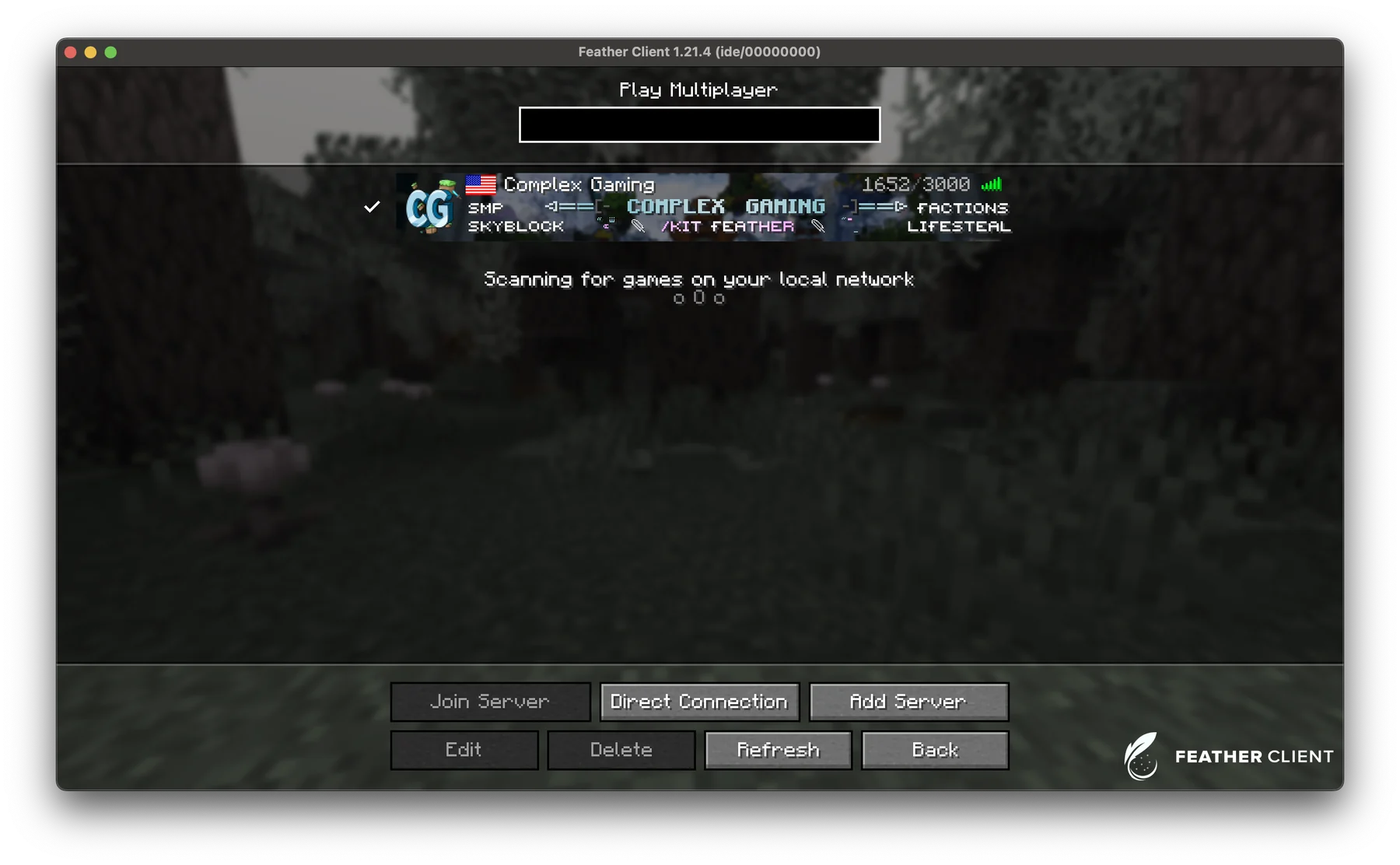
A custom background image displayed behind a server entry in Feather's server list.
#Basic Usage
Here's a simple example of setting a server list background:
try {
    // Get the MetaService from the FeatherAPI
    MetaService metaService = FeatherAPI.getMetaService();

    // Create a background from an image file
    ServerListBackground background = metaService.getServerListBackgroundFactory()
        .byPath(plugin.getDataFolder().toPath().resolve("server-background.png"));

    // Set the background
    metaService.setServerListBackground(background);

} catch (ServerListBackgroundException | IOException e) {
    // Handle errors
    e.printStackTrace();
}#Image Requirements
Feather has specific requirements for server list background images:
- Format: Only PNG format is currently supported
- Recomended dimensions: 909x102 pixels
- Maximum dimensions: 1009×202 pixels
- Maximum file size: 512 KB
Attempting to use images that don't meet these requirements will result in exceptions being thrown when setting the background.
#Detailed Usage
#Creating a Background from a File
The most common way to create a server background is from an image file:
Path imagePath = plugin.getDataFolder().toPath().resolve("backgrounds/my-background.png");
ServerListBackground background = metaService.getServerListBackgroundFactory().byPath(imagePath);#Creating a Background from Bytes
If you have image data as a byte array, you can create a background from it:
// With explicit format
ServerListBackground background = factory.fromBytes(imageBytes, ImageFormat.PNG);

// With automatic format detection (if supported by the implementation)
ServerListBackground background = factory.fromBytes(imageBytes);#Setting the Background
Once you have a ServerListBackground object, you can set it as the server's background:
metaService.setServerListBackground(background);#Retrieving the Current Background
You can get the currently set background with:
ServerListBackground currentBackground = metaService.getServerListBackground();
if (currentBackground != null) {
    // The background is set
} else {
    // No background is currently set
}#Exception Handling
When working with server list backgrounds, several exceptions may be thrown:
UnsupportedImageFormatException- When the image format is not supported (currently only PNG is supported)ImageSizeExceededException- When the image dimensions or file size exceed the maximum limitsInvalidImageException- When the image data is corrupted or otherwise invalid
It's important to handle these exceptions appropriately:
try {
    ServerListBackgroundFactory factory = metaService.getServerListBackgroundFactory();
    ServerListBackground background = factory.byPath(imagePath);
    metaService.setServerListBackground(background);
} catch (UnsupportedImageFormatException e) {
    logger.error("Image format not supported. Only PNG is supported.", e);
} catch (ImageSizeExceededException e) {
    logger.error("Image is too large. Maximum dimensions: 1009×202, Maximum size: 512KB", e);
} catch (InvalidImageException e) {
    logger.error("Image file is corrupted or invalid.", e);
} catch (IOException e) {
    logger.error("Error reading image file.", e);
}#Best Practices
#Optimizing Image Size
Server list backgrounds are sent to players when they connect, so it's important to optimize your images to minimize the impact on connection times:
- Compress PNG files to reduce their size while maintaining quality
- Use the smallest dimensions that still look good (staying under the 1009×202 limit)
- Consider using fewer colors to reduce file size
#Background Loading on Startup
Load your server background when your plugin starts:
@Override
public void onEnable() {
    // Create the backgrounds directory if it doesn't exist
    Path backgroundsDir = getDataFolder().toPath().resolve("backgrounds");
    try {
        Files.createDirectories(backgroundsDir);
    } catch (IOException e) {
        getLogger().severe("Failed to create backgrounds directory");
        e.printStackTrace();
    }

    // Load the configured background
    String backgroundFile = getConfig().getString("background", "default.png");
    loadBackground(backgroundFile);
}

private void loadBackground(String filename) {
    try {
        Path imagePath = getDataFolder().toPath().resolve("backgrounds").resolve(filename);
        if (Files.exists(imagePath)) {
            ServerListBackground background = FeatherAPI.getMetaService()
                .getServerListBackgroundFactory()
                .byPath(imagePath);
            FeatherAPI.getMetaService().setServerListBackground(background);
            getLogger().info("Server background loaded: " + filename);
        } else {
            getLogger().warning("Background file not found: " + filename);
        }
    } catch (Exception e) {
        getLogger().severe("Error loading server background");
        e.printStackTrace();
    }
}#Common Pitfalls
#Image Loading Thread Safety
The image loading process involves file I/O operations and should be performed off the main server thread to avoid blocking:
Bukkit.getScheduler().runTaskAsynchronously(plugin, () -> {
    try {
        ServerListBackground background = FeatherAPI.getMetaService()
            .getServerListBackgroundFactory()
            .byPath(imagePath);

        try {
            FeatherAPI.getMetaService().setServerListBackground(background);
            logger.info("Server background updated successfully");
        } catch (Exception e) {
            logger.error("Error setting server background", e);
        }
    } catch (Exception e) {
        logger.error("Error loading server background", e);
    }
});#Limitations
- The server background is only sent once when a player connects and has not already received the background
- The background cannot be updated dynamically for connected players
- Only PNG format is currently supported
- The image dimensions are limited to 1009×202 pixels
- The image file size is limited to 512 KB