
UI RPC Communication
The Remote Procedure Call (RPC) system enables bidirectional communication between your server and the Feather UI. This system allows you to create interactive UI elements that can trigger actions on the server and receive responses.
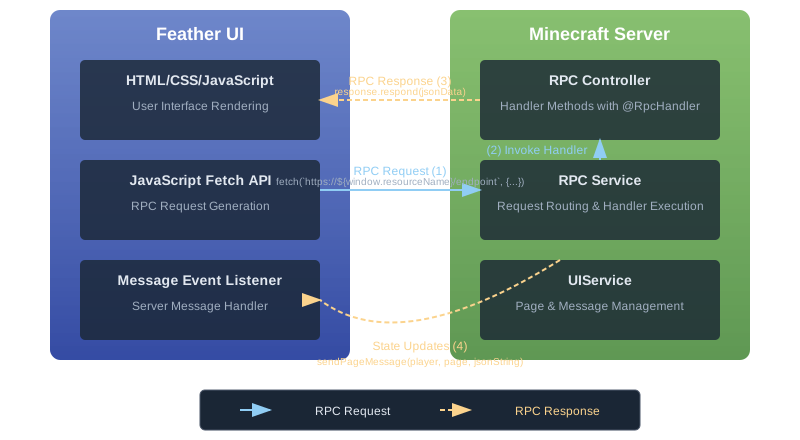
Diagram showing the flow of RPC requests and responses between the client UI and server.
#How RPC Works in Feather
- The client UI makes an HTTP-like request to a specific endpoint
- The server routes the request to the appropriate RPC handler
- The server processes the request and generates a response
- The response is sent back to the client UI
#Creating RPC Controllers
RPC controllers are Java classes that handle requests from the client. Each controller can have multiple handler methods for different operations.
#Basic Controller Structure
public class ShopController implements RpcController {
  @RpcHandler("buyItem")
  public void buyItem(RpcRequest request, RpcResponse response) {
    // Get the player
    FeatherPlayer player = request.getSource();

    // Parse the request body (usually JSON)
    String requestBody = request.getBody();
    JsonObject json = new Gson().fromJson(requestBody, JsonObject.class);

    // Process the request
    int itemId = json.get("itemId").getAsInt();
    int quantity = json.get("quantity").getAsInt();

    // Perform the action
    boolean success = processPurchase(player, itemId, quantity);

    // Send a response
    JsonObject responseJson = new JsonObject();
    responseJson.addProperty("success", success);
    if (!success) {
      responseJson.addProperty("error", "Not enough coins");
    }

    response.respond(new Gson().toJson(responseJson));
  }

  private boolean processPurchase(FeatherPlayer player, int itemId, int quantity) {
    // Implementation details
    return true; // Return success or failure
  }
}#Registering Controllers
Once you've created an RPC controller, you need to register it with the UI page:
// Create and configure the UI page
UIPage shopPage = FeatherAPI.getUIService().registerPage(this, "https://example.com/shop.html");

// Register the RPC controller
ShopController controller = new ShopController();
FeatherAPI.getUIService().registerCallbacks(shopPage, controller);#Making RPC Calls from the Client
In your HTML/JavaScript, you can make RPC calls using the fetch API:
async function buyItem(itemId, quantity) {
  try {
    const response = await fetch(`https://${window.resourceName}/buyItem`, {
      method: 'POST',
      body: JSON.stringify({
        itemId: itemId,
        quantity: quantity
      })
    });

    const result = await response.json();

    if (result.success) {
      showSuccessMessage(`Successfully purchased ${quantity} items!`);
    } else {
      showErrorMessage(result.error || 'Failed to purchase items');
    }
  } catch (error) {
    showErrorMessage('Network error, please try again');
    console.error(error);
  }
}

// Call the function when a button is clicked
document.getElementById('buy-button').addEventListener('click', () => {
  const itemId = parseInt(document.getElementById('item-id').value);
  const quantity = parseInt(document.getElementById('quantity').value);
  buyItem(itemId, quantity);
});#RPC Best Practices
#1. Use JSON for Request/Response Bodies
JSON is easy to parse in both Java and JavaScript and provides a structured format for your data.
// Server-side
JsonObject json = new Gson().fromJson(request.getBody(), JsonObject.class);

// Client-side
fetch(`https://${window.resourceName}/endpoint`, {
  method: 'POST',
  body: JSON.stringify(data)
});#2. Implement Proper Error Handling
Always handle errors gracefully on both the client and server:
// Server-side
try {
  // Process the request
  response.respond(successResponse);
} catch (Exception e) {
  JsonObject error = new JsonObject();
  error.addProperty("success", false);
  error.addProperty("error", "An error occurred: " + e.getMessage());
  response.respond(new Gson().toJson(error));
}

// Client-side
try {
  const response = await fetch(`https://${window.resourceName}/endpoint`, {
    ...
  });
  const data = await response.json();

  if (!data.success) {
    displayError(data.error);
    return;
  }

  // Process successful response
} catch (error) {
  displayError("Network error or server unavailable");
  console.error(error);
}#3. Always Send a Response
Every RPC request must receive a response, even if there's no data to return. Failing to call response.respond() will cause the request to timeout and fail on the client side.
@RpcHandler("validateUsername")
public void validateUsername(RpcRequest request, RpcResponse response) {
  // Get the request data
  String username = request.getBody();

  // Process the validation
  boolean isValid = validateUsername(username);

  if (isValid) {
    // Even when there's no data to return, we must respond with at least an empty string
    // This prevents timeouts by acknowledging we received and processed the request
    response.respond("");
  } else {
    // In case of error, provide details
    JsonObject error = new JsonObject();
    error.addProperty("valid", false);
    error.addProperty("message", "Username contains invalid characters");
    response.respond(new Gson().toJson(error));   // Always respond, even for errors
  }

  // Incorrect: Not calling response.respond() will cause the request to time out!
}#3. Validate All User Input
Never trust input from the client. Always validate and sanitize data before using it:
@RpcHandler("transferMoney")
public void transferMoney(RpcRequest request, RpcResponse response) {
  // Get player
  FeatherPlayer player = request.getSource();

  try {
    // Parse and validate the request
    JsonObject json = new Gson().fromJson(request.getBody(), JsonObject.class);

    if (!json.has("recipient") || !json.has("amount")) {
      sendErrorResponse(response, "Missing required fields");  // Always respond, even for errors
      return;
    }

    String recipientName = json.get("recipient").getAsString();
    double amount = json.get("amount").getAsDouble();

    // Validate the amount
    if (amount <= 0) {
      sendErrorResponse(response, "Amount must be positive");
      return;
    }

    // Find the recipient
    Player recipientPlayer = Bukkit.getPlayer(recipientName);
    if (recipientPlayer == null) {
      sendErrorResponse(response, "Recipient not found");
      return;
    }

    // Process the transfer
    boolean success = processTransfer(player, recipientPlayer, amount);

    // Send response
    JsonObject responseJson = new JsonObject();
    responseJson.addProperty("success", success);
    response.respond(new Gson().toJson(responseJson));
  } catch (Exception e) {
    sendErrorResponse(response, "Invalid request format");
  }
}

private void sendErrorResponse(RpcResponse response, String errorMessage) {
  JsonObject error = new JsonObject();
  error.addProperty("success", false);
  error.addProperty("error", errorMessage);
  response.respond(new Gson().toJson(error));
}#4. Implement Rate Limiting
Protect your server from spam by implementing rate limiting on RPC calls:
private final Map<UUID, Long> lastRequestTime = new HashMap<>();
private static final long MIN_REQUEST_INTERVAL = 500; // milliseconds

@RpcHandler("action")
public void handleAction(RpcRequest request, RpcResponse response) {
  FeatherPlayer player = request.getSource();
  UUID playerId = player.getUniqueId();

  // Check if the player is making requests too quickly
  long currentTime = System.currentTimeMillis();
  Long lastRequest = lastRequestTime.get(playerId);

  if (lastRequest != null && currentTime - lastRequest < MIN_REQUEST_INTERVAL) {
    // Request is too soon after the previous one
    JsonObject error = new JsonObject();
    error.addProperty("success", false);
    error.addProperty("error", "Please wait before making another request");
    response.respond(new Gson().toJson(error));
    return;
  }

  // Update the last request time
  lastRequestTime.put(playerId, currentTime);

  // Process the request normally
  // ...
}#Advanced RPC Patterns
#Asynchronous Processing
For operations that take time, you can process them asynchronously and respond later. The RPC system supports delayed responses with a 30-second timeout:
@RpcHandler("generateWorld")
public void generateWorld(RpcRequest request, RpcResponse response) {
  FeatherPlayer player = request.getSource();
  JsonObject json = new Gson().fromJson(request.getBody(), JsonObject.class);
  String worldName = json.get("worldName").getAsString();

  // Process the long-running task asynchronously
  Bukkit.getScheduler().runTaskAsynchronously(myPlugin, () -> {
    try {
      // Simulate a long operation
      boolean success = worldGenerator.generateWorld(worldName);

      // Create the response
      JsonObject result = new JsonObject();
      result.addProperty("success", success);
      result.addProperty("worldName", worldName);

      // Send the response after processing is complete
      // Note: You must respond within 30 seconds or the request will time out
      response.respond(new Gson().toJson(result));
    } catch (Exception e) {
      // Handle errors and still respond
      JsonObject error = new JsonObject();
      error.addProperty("success", false);
      error.addProperty("error", e.getMessage());
      response.respond(new Gson().toJson(error));
    }
  });
}
Important: The
response.respond()method can be called asynchronously, but you must call it within 30 seconds of receiving the request. After this timeout period, the request will be considered failed, and any responses will be ignored.
For very long operations that might exceed the 30-second timeout, send an immediate acknowledgment and use the page messaging system for progress updates:
@RpcHandler("generateLargeWorld")
public void generateLargeWorld(RpcRequest request, RpcResponse response) {
  FeatherPlayer player = request.getSource();
  JsonObject json = new Gson().fromJson(request.getBody(), JsonObject.class);
  String worldName = json.get("worldName").getAsString();

  // Send an immediate acknowledgment
  JsonObject initialResponse = new JsonObject();
  initialResponse.addProperty("status", "processing");
  initialResponse.addProperty("message", "World generation started");
  initialResponse.addProperty("taskId", UUID.randomUUID().toString());
  response.respond(new Gson().toJson(initialResponse));

  // Process the long-running task asynchronously
  Bukkit.getScheduler()
      .runTaskAsynchronously(
          myPlugin,
          () -> {
            try {
              // Generate the world (might take longer than 30 seconds)
              boolean success = worldGenerator.generateWorld(worldName);

              // Send completion notification via messages
              JsonObject updateMessage = new JsonObject();
              updateMessage.addProperty("type", "worldGenerationComplete");
              updateMessage.addProperty("success", success);
              updateMessage.addProperty("worldName", worldName);

              // Send the update to the player
              UIPage page = getUIPageForPlayer(player);
              FeatherAPI.getUIService()
                  .sendPageMessage(player, page, new Gson().toJson(updateMessage));
            } catch (Exception e) {
              // Handle errors
              JsonObject errorMessage = new JsonObject();
              errorMessage.addProperty("type", "worldGenerationError");
              errorMessage.addProperty("error", e.getMessage());

              UIPage page = getUIPageForPlayer(player);
              FeatherAPI.getUIService()
                  .sendPageMessage(player, page, new Gson().toJson(errorMessage));
            }
          });
}
In this pattern, your UI code needs to handle both the immediate RPC response and the follow-up messages:
// Make the initial request
async function startWorldGeneration(worldName) {
  try {
    const response = await fetch(`https://${window.resourceName}/generateLargeWorld`, {
      method: 'POST',
      body: JSON.stringify({ worldName })
    });

    const result = await response.json();

    if (result.status === "processing") {
      showProgressIndicator();
      // Request was accepted, now wait for messages
      console.log(`World generation started with task ID: ${result.taskId}`);
    } else {
      showError("Failed to start world generation");
    }
  } catch (error) {
    showError("Network error, please try again");
  }
}

// Set up a message listener for updates
window.addEventListener('message', function(event) {
  const data = event.data;

  // Handle world generation progress updates
  if (data.type === "worldGenerationComplete") {
    hideProgressIndicator();
    if (data.success) {
      showSuccess(`World "${data.worldName}" has been generated successfully!`);
    } else {
      showError(`Failed to generate world "${data.worldName}"`);
    }
  }

  // Handle error messages
  if (data.type === "worldGenerationError") {
    hideProgressIndicator();
    showError(`Error during world generation: ${data.error}`);
  }
});